🔐 Your institution's work accounts. Your security policies. A simpler way to sign in.
We’re excited to introduce Single Sign-On (SSO) with Microsoft 365 and Google Workspace!
If your institution uses Microsoft 365 or Google Workspace, you can now sign in using your existing organisational account, making everyday access simpler while keeping authentication aligned with your institution’s security policies.
🔑 Simpler Sign-In. Smarter Authentication.
Single Sign-On brings the convenience of familiar workplace accounts together with the security controls your institution already uses.
-
One less password to remember. Staff sign in using their existing Microsoft 365 or Google Workspace accounts.
-
Your security policies, already in place. Apply your organisation’s existing authentication requirements, including Multi-Factor Authentication (MFA), through Microsoft or Google.
-
Authentication on your terms. Restrict SSO to identities authorised through your institution’s configured Microsoft Entra ID directory or approved Google Workspace domains.
🛡️ Your Institution Controls Authentication
Unlike standard social sign-in, this integration is designed for institutional authentication, not unrestricted access using any Microsoft or Google account.
Microsoft Entra ID
Your institution configures a Microsoft Entra ID tenant (directory) for SSO. Authentication is restricted to identities authorised through that directory.
Google Workspace
Your institution configures its authorised Google Workspace domains, which are verified during authentication.
Only accounts associated with those approved domains can authenticate. Personal Gmail accounts are not supported.
💬 FAQs
From the November 2026 release.
Single Sign-On with Microsoft and Google is included in the PLUS plan at no additional cost.
Yes! We’re updating authentication in Classic to support Single Sign-On, making SSO available in both Next Generation and Classic. Certain eligibility requirements apply to users signing in through Classic.
Yes. SSO handles authentication only. User accounts, roles and permissions continue to be managed in eBECAS. SSO does not automatically create accounts or assign permissions.
When signing in through SSO, authentication is handled by Microsoft or Google, including any MFA policies configured by your institution.
The standard MFA process does not apply to SSO sign-ins but continues to apply when users sign in with their eBECAS username and password.
With the November 2026 release, two new apps will be available in Next Generation, one for Microsoft and one for Google Single Sign-On.
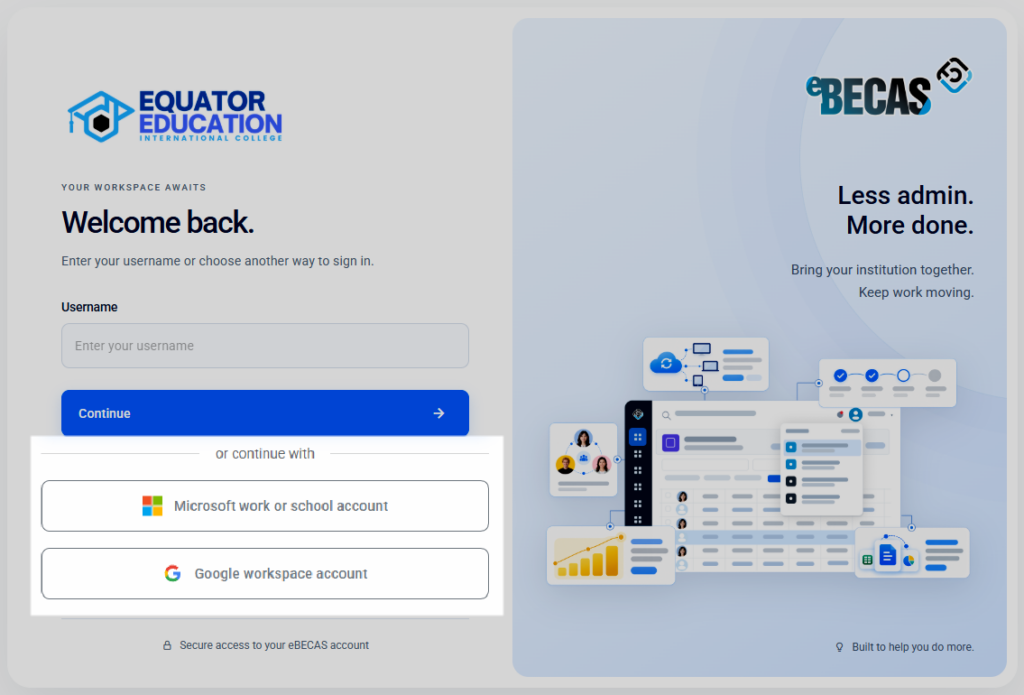
Simply install and configure the app for your institution’s preferred authentication provider. Once configured, eligible users will see the corresponding Single Sign-On option on the login screen.